01
More competitive card-processing rates
For qualified restaurants we can offer competitive card-processing programs, with target rates of about 1.5%–1.8%.
For buffet restaurants with high card volume, even a small reduction adds up to real savings over time.
The exact rate depends on the merchant's sales volume, average ticket, card types, transaction methods, business history, and underwriting review.
02
Free ordering system and equipment
Qualified merchants can receive a free order-taking system and related equipment, including:
- Ordering POS devices
- Order printers
Each area and role gets its own device, so the front desk, servers, kitchen, and managers work together more efficiently.
Exact quantities, models, and service terms follow the final agreement.
03
One connected flow, designed for buffets
This POS was designed around how a buffet actually runs.
From guests arriving, host seating, table assignment, guest counts, and drink orders, to server add-ons, tableside payment, clearing the table, and sales reports, every step is connected.
The traditional buffet routine is clumsy:
- The host walks guests to a table;
- Table number, guest count, and drinks are written by hand;
- A server re-enters the order on another device;
- The front desk sorts ticket numbers and matches table numbers;
- At payment, staff confirm the bill and payment status yet again.
These repeated steps waste time and lead to wrong table numbers, wrong guest counts, missed orders, duplicate orders, and bills that don't match.
With our system, the front desk, servers, and cashier share the same order and table status, which sharply reduces duplicate work.
04
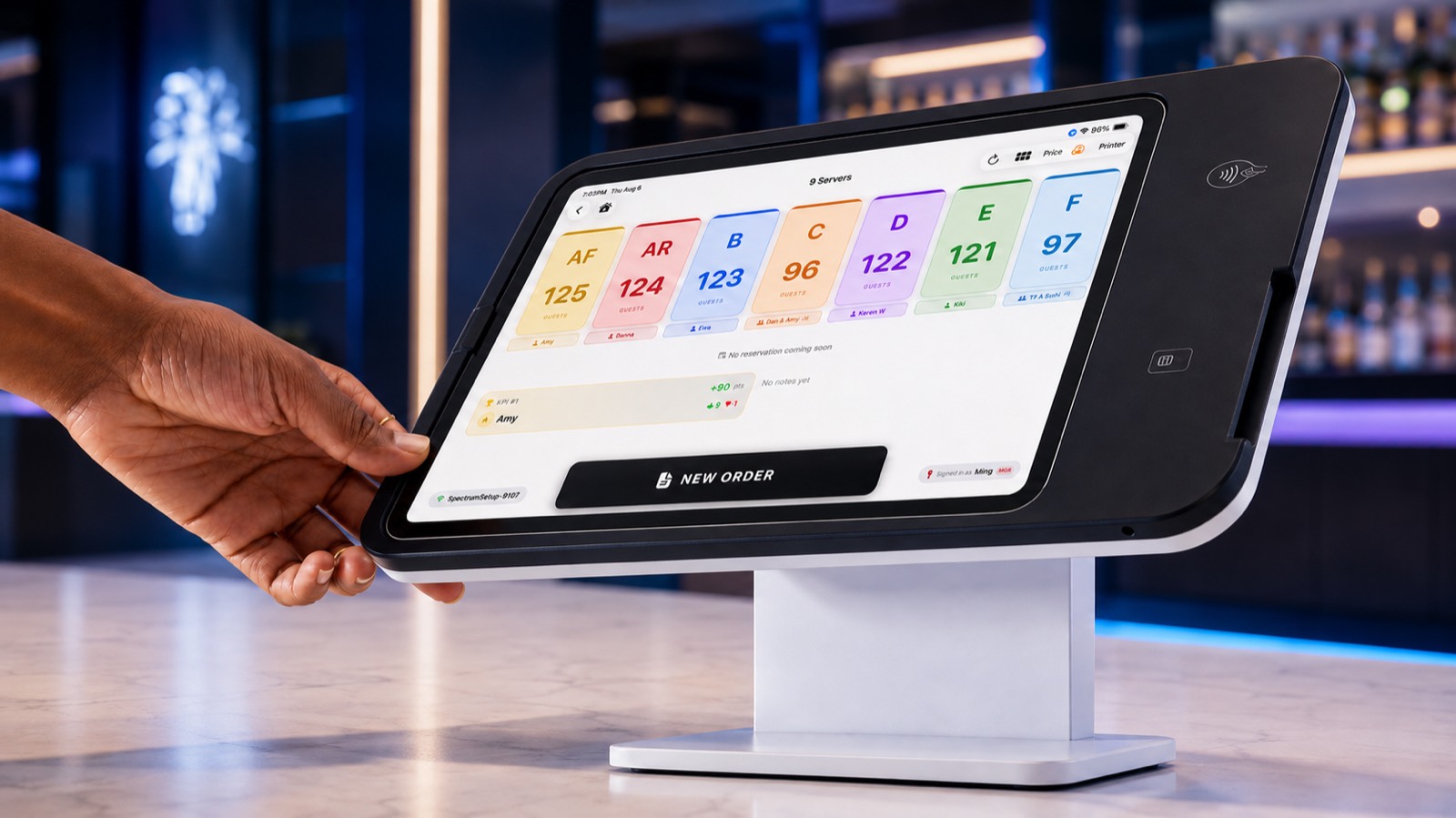
The host sees every section's traffic at a glance
Hosts see the restaurant's table layout right on the iPad, including:
- Which tables are in each section
- Which tables can seat new guests right now
- Which tables are in use
- Which tables have paid
- How many guests each section has right now
- How many tables and guests each server is handling
- Which tables are waiting to be cleared
- Whether the workload is balanced across sections
With live information, the host decides quickly which section and table to seat the next party at, so no section is slammed while another sits idle.
Seating becomes fairer, clearer, and more orderly, with no need for hosts to rely on memory or count by hand.
05
Open the table and order right after seating
Once guests are seated, the host opens the table on the iPad and enters:
- Table number
- Service section
- Server
- Number of adults
- Number of children
- Seniors or other special-price guests
- Lunch or dinner pricing
- Drink choices
- Special notes
No more paper slips that a server then re-types on another device.
That means less paper, less duplicate work, fewer entry errors, and less time at the front desk sorting table numbers and slips.
06
Servers see new tables and orders immediately
As soon as the host seats a party and opens the table, the server for that section sees on their own device:
- The new party's table number
- Adults, children, and seniors
- The drinks the guests chose
- The current bill amount
- Special requests or notes
- The table's payment status
Servers don't have to ask about drinks again or re-enter them, so they start service sooner with fewer missed, wrong, or duplicate orders.
If guests add drinks or other charged items, the server adds them straight to the existing bill.
For tighter internal control, changes that affect the bill amount, such as drinks, guest counts, or other charges, should be handled by the front desk or a manager with the right permission.
07
Servers close out checks at the table
Servers take card payments or other approved checkout steps right at the guest's table, so nobody waits in a line at the register.
Once payment is done:
- The payment record syncs automatically
- The bill status updates immediately
- The server can confirm on the spot that the guests have paid
- No trip to the front desk to double-check
- The table moves to “waiting to be cleared” or “empty” automatically
- Once cleared, it's ready for the next party
Guests check out faster, tables turn faster, and the front-desk cashier has even less to do.
08
Every cash payment clearly recorded
The system records every cash transaction in detail, including:
- Payment time
- Amount
- Order number
- Table number
- Employee who took the payment
- Device used
- Change given
- Order edits
- Voids and refunds
- Manager authorizations
The owner knows exactly when each cash payment came in, which employee took it, and which table and order it belongs to.
That makes reconciling cash, handing over shifts, and explaining drawer differences far easier, with less confusion about who was responsible.
09
Stronger permissions, lower risk of misuse
Permissions follow each employee's role, for example:
- Hosts seat guests and open tables
- Servers view their section and add items
- Cashiers take payments
- Managers change guest counts, drinks, and prices
- The owner sees full reports and activity logs
Sensitive actions such as deleting items, changing guest counts or prices, voiding orders, refunds, and reopening paid bills can require a manager passcode or owner authorization.
Every important action keeps a record of the time, employee, and device, so the owner can review it later.
10
Far less work at the front desk
Because hosts open tables and servers can view orders, add items, and take payment at the table, work that used to pile up at the front desk is spread out.
The front desk no longer spends its time:
- Sorting paper slips
- Looking up table numbers
- Re-entering orders
- Checking guest counts
- Keying in server tips
- Confirming whether a table has paid
- Counting each server's tables by hand
- Re-checking cash and card totals
Front-desk staff can spend more time greeting guests, handling special situations, and keeping the restaurant running smoothly.
11
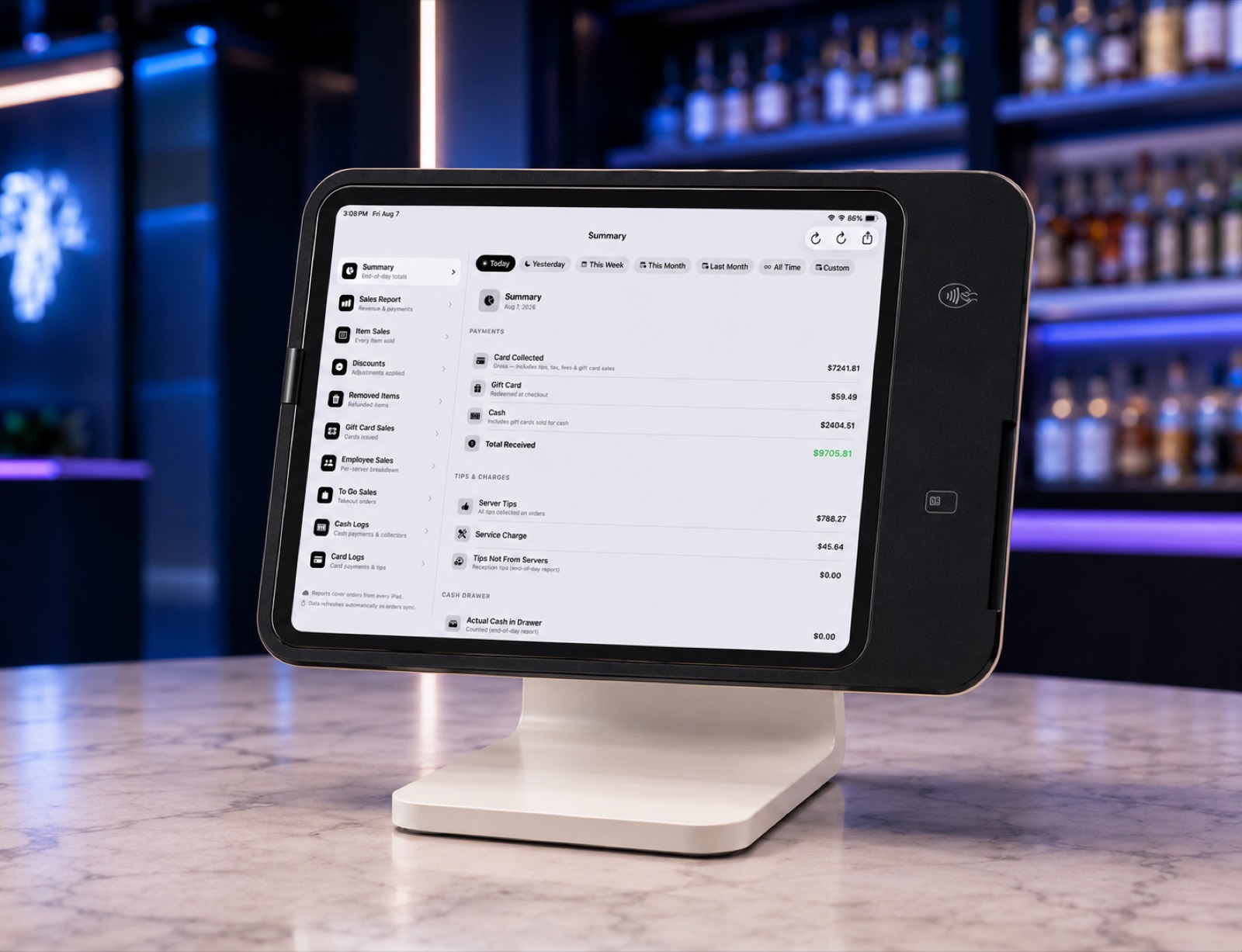
A simple, clear end-of-night close
At closing, the system organizes the day's numbers automatically, and every record is easy to read.
Reports can show:
- Lunch adult count
- Dinner adult count
- Children, by age group
- Seniors and other special-price guests
- Lunch and dinner sales
- Total card payments
- Total cash payments
- Gift card sales and redemptions
- Discounts and promotions
- Refunds and voids
- Tax
- Service charges
- Tips
- Tables and guests per server
- Tip detail per server
- Sales by shift
- Cashier cash differences
Card tips never have to be re-keyed at night. Every tip is recorded automatically under the right server, so employee close-out, cash reconciliation, and tip allocation are faster and more accurate.
12
Easier staff training
With a visual table map, section statuses, and clear buttons, new employees understand the restaurant's workflow faster.
Hosts don't need complex math or to remember how many guests each section already has. The system shows each section's and server's live workload, so staff can see where the next party should go.
This helps the owner:
- Shorten host training
- Reduce new-employee mistakes
- Shorten cashier training
- Keep the workflow consistent across staff
- Depend less on veteran employees
13
Live table and order status
Each table's status shows in a different color or state, for example:
- Empty
- Seated
- Dining
- Waiting to pay
- Partially paid
- Paid
- Waiting to be cleared
- Out of service
Staff see the state of the restaurant at a glance instead of constantly asking the front desk or other servers.
14
More flexible, better-controlled cash order management
Based on the restaurant's permission settings, the owner or an authorized manager can correct, void, refund, or restore cash orders.
To keep financial records complete, the system should keep the original order and a full trail of every action, including:
- Who made the change
- When
- Before and after
- Reason
- Authorizing manager
- Device used
That covers the real need to fix mistaken orders while making sure every change can be traced.
15
All your delivery platforms in one system
Orders from DoorDash, Uber Eats, and other supported platforms flow into the same POS.
Orders from every platform can:
- Enter the POS automatically
- Show their source
- Route automatically to the right kitchen, bar, or printer
- Skip manual re-entry
- Reduce missed and mis-keyed orders
- Show their status in one place
No more lining the counter with tablets and printers for every platform. One system manages orders from every source clearly.
Whether a given platform can connect directly depends on that platform's API availability and authorization terms.
16
Free e-gift cards and discount cards
E-gift cards and coupons are built in. You can create:
- Electronic gift cards
- Discount cards
- Coupons
- Member-only offers
- Holiday promotions
- Birthday offers
- Returning-customer rewards
Gift cards, discount cards, and coupons can be sent to customers by mobile number or email.
There is no separate gift card system to buy. Customer spending, gift card balances, promotions, and member profiles connect in one place.
17
Powerful membership and marketing tools
The system helps the restaurant build its own customer membership database over time.
With customer consent and in line with applicable text and email marketing rules, the restaurant can text or email members about:
- Promotions
- Member rewards
- New menu items
- Birthday offers
- Holiday specials
- Returning-customer offers
- Coupons
- Special hours notices
- Gift cards
Instead of depending entirely on third-party platforms, the restaurant builds its own customer base and marketing channel, and brings guests back more often.
18
A custom website built for your restaurant
We design a modern official website and online ordering system around each restaurant's brand, menu, and business model.
Your website can include:
- Restaurant brand and story
- Address, phone, and hours
- Full menu
- A high-quality photo of every dish
- Online ordering
- Pickup / delivery
- Membership
- Gift cards
- Promotions
- Mobile-optimized design
- Map and directions
- Online contact
- Social media links
We keep the ordering flow as simple as possible, removing unnecessary steps so customers can order quickly and easily.
Taking orders through your own website reduces dependence on third-party platforms and builds your own brand and online ordering channel.
19
Free help replying to online reviews
We help restaurant owners reply to customer reviews on Google and other platforms at no charge.
Positive reviews get a prompt thank-you and an invitation to return. Negative reviews get a professional, reasonable, and courteous reply that improves communication and protects the restaurant's image.
Review content and suggested replies are always confirmed by the owner, so every reply reflects how the restaurant actually handles things.
20
Clear, detailed business reports
Owners can check the restaurant's key numbers at any time, for example:
- Daily, weekly, and monthly sales
- Lunch vs. dinner sales
- Adult, child, and senior counts
- Average ticket
- Card and cash revenue
- Tips and service charges
- Guest traffic per section
- Tables and guests per server
- Peak hours
- Gift card sales and redemptions
- Promotion results
- Delivery platform order sources
- Void, refund, and discount records
With this data, owners understand the real state of the business faster and spot what to improve in staffing, pricing, guest traffic, and workflow.
21
Multi-location remote management
For owners with several buffet restaurants, the system can add multi-location management as needed.
From one management account, the owner can see each location's:
- Live sales
- Guest traffic and head counts
- Card and cash revenue
- Tips and service charges
- Refunds and voided orders
- Daily sales reports
- Staff activity logs
Even when the owner isn't on site, they stay on top of how every location is doing.